Visualisation of circuits

Quantum computing basics part 2

A picture is worth a thousand words. This old saying holds true in almost any subject one can think of. It is no different when it comes to implementation of quantum circuits. Visualisation of circuits can be crucial, especially when you build bigger, more complicated ones. It may be much easier to understand what they do, and why they yield these (and not other) results when looking at their diagrams instead of the code that brought them to life. In this post I will walk you through the most common use cases in circuit visualisation.

I use Qiskit as the quantum framework of choice, and the code you see here is written in Python.

A simple circuit

You cannot visualise something that does not exist, so let us start with a rather simple circuit that we are going to use through most of this article. 

circuit = QuantumCircuit(3, 3)
circuit.h(range(3))
circuit.x(0)
circuit.cz(0, 1)
circuit.x(2)
circuit.measure(range(3), range(3))

Simple draw

So, what does this circuit do? Looking at the code, you can tell that it applies a Hadamard gate to all the qubits, then a NOT gate to the first qubit, a control-Z gate to the first and second qubits, and finally a NOT gate to the last qubit. Then a measurement is performed on all the qubits. But in order to tell it, you must remember how the range() function works, and how the qubits are ordered in Qiskit. It would be much easier to not have to rely on all this knowledge, would it not? 

Qiskit has a lot of sophisticated functionality as far as drawing the circuits goes, but it is also vital to know the basics. After all, all that functionality relies on packages and software that may not be available to you all the time. The first and simplest way to get a circuit print is to pass it to the print() function.

print(circuit)
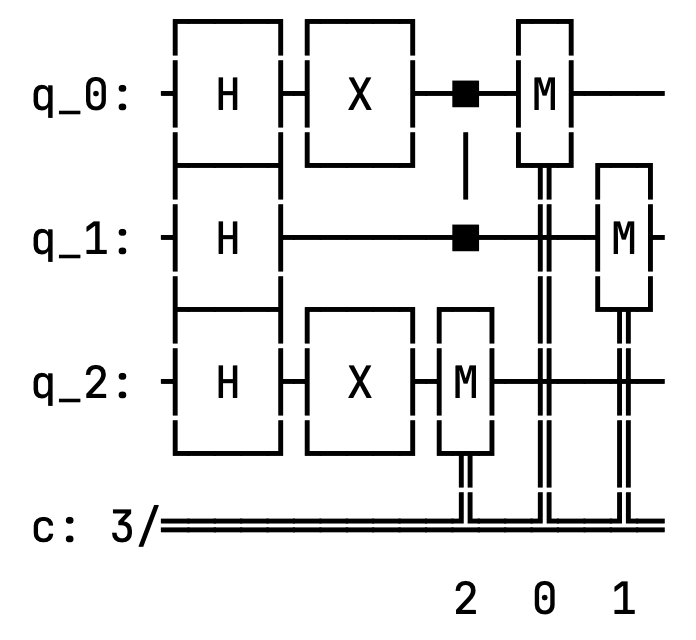
It is not pretty, but it works. A slightly better result can be achieved by calling the draw() function on the circuit object.
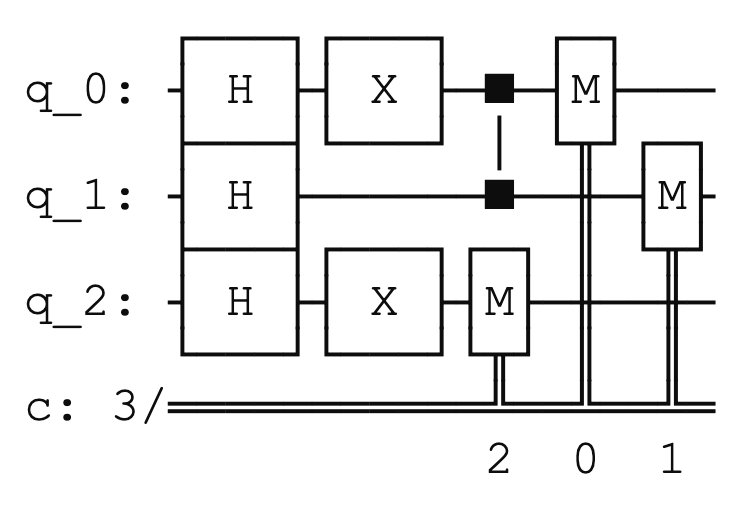
This one looks much better. But can we even get better than this?

Rendering engines

Qiskit supports external rendering engines. A rendering engine is a software component responsible for converting data (like vector graphics, text, or 3D models) into a visual output (e.g., images, animations, or interactive displays). It handles tasks like drawing shapes, applying colors, managing fonts, and rendering layouts. You can use those engines to get better circuit diagrams than the simple draw allows for.

The less popular, but more capable, engine is LaTeX. It is a separate software package that must be installed independently on the system. If you use a MacBook like me, you can get a copy here. Additionally, you must ensure that your project uses the qcircuit package. Then you can select the LaTeX backend as your rendering system this way:

circuit.draw(output="latex")

The most popular engine is Matplotlib. I guess it is because its capabilities are fairly decent, but it is much easier to install, and manage. You just have to install the pylatexenc and matplotlib packages in your virtual environment (or Jupyter server), and you are good to go. Then you can print the circuit using the following command.

circuit.draw(output="mpl")
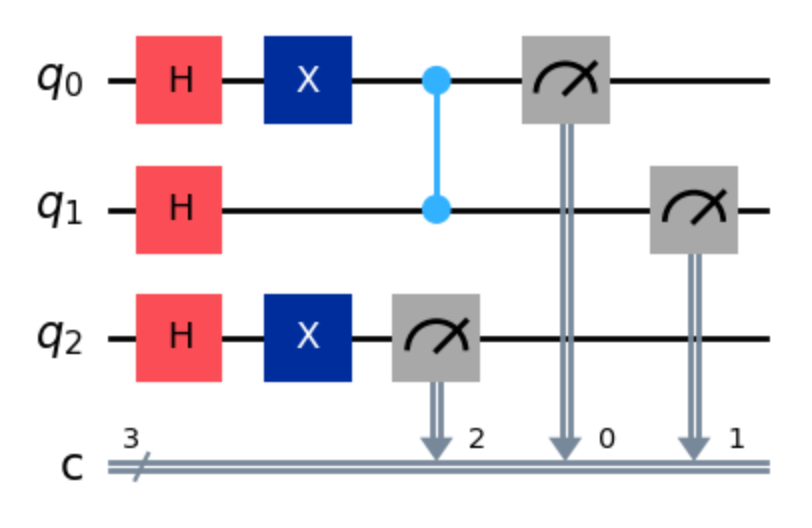
This one looks much better, does it not?

I will use Matplotlib in the rest of the examples in this article, but if you wish to use LaTeX instead, just change the value that you pass to the output parameter.

How does the  draw function work?

Normally, the  draw method returns the rendered image as an object and prints nothing.

Which class it returns depends on the output you specify: the default  ’text’  yields a  TextDrawer,  ’mpl’  yields a  matplotlib.Figure, and  ’latext’  yields a PIL.Image object. Jupyter notebooks recognise these return types and display them automatically, but outside of Jupyter the images will not appear on their own. So do not be surprised that nothing is drawn if you use a vanilla Python environment.

Saving the output

So far so good, but apart from visual inspection, the figures that we have plotted are not for much use. Sure, you can make print screens of them to include them in your documentation, or share around, but it will soon become cumbersome, or not really feasible (especially, if your circuits get bigger and bigger). Luckily, you can save the render to a separate file.

Sometimes our circuits can get quite big. Jupyter does its best to fit them in the available space, but it can be useful to save the diagram as an image file. The draw method has an optional argument filename that allows us to specify the name of the file where to save the diagram. The file format is inferred from the extension of the filename, and it can be any format supported by Matplotlib, such as PNG, PDF, SVG, etc. This way you can save the diagram in a high-quality format that can be easily included in reports, presentations, or publications, or just enlarge it to see the details more clearly.

circuit.draw(output="mpl", filename="circuit-mpl.png")

By default the file is saved to the current working directory, but you can provide a relative or an absolute path if you wish to override this behaviour.

circuit.draw(output="mpl", filename="./img/circuit-mpl.png")

Additional controls

Interactivity

Interactivity is actually a big word for what is available in circuit plotting. When you call the  draw function using either Matplotlib or LaTeX as the render engines, you can pass the interactivity=True argument in the  kwarg parameter. It will cause the drawing to be opened in a new window. It has one downside though. It does not work in Jupyter notebooks so well.

Barriers 

Barriers are a very useful tool in bigger circuits, but they can be effectively demonstrated in our small circuit too. Let us rewrite it adding two barriers to it.

circuit = QuantumCircuit(3, 3)
circuit.h(range(3))
circuit.barrier()
circuit.x(0)
circuit.cz(0, 1)
circuit.x(2)
circuit.barrier()
circuit.measure(range(3), range(3))

Calling the circuit.draw(output="mpl") function will give us the following result.
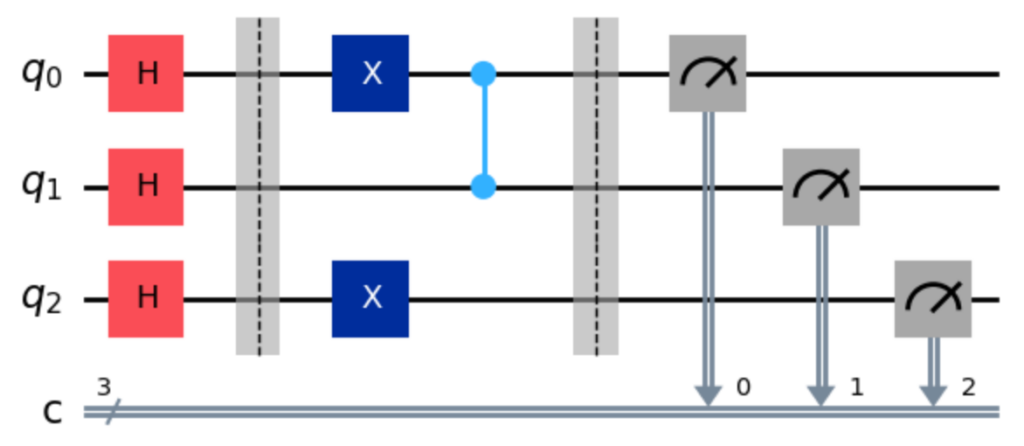
The barriers are those two vertical, grey bars. They do not have any logical effect on the circle, but allow us to visually group distinct parts of it.

Some circuits come in with built-in barriers. This can be the case when you use a quantum primitive, or you append sub-circuits to a bigger one. They are there to distinguish distinct parts of the super-circuit. But sometimes they may be in the way of what you are trying to achieve. You can disable them with the following line of code.

circuit.draw(output="mpl", plot_barriers=False)

In the case of our modified circuit we will get the following result.
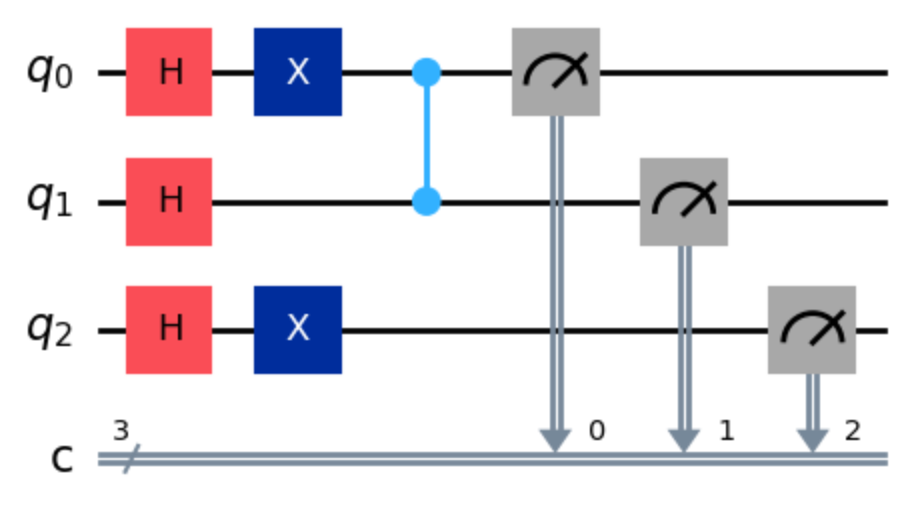
Sure, in the case of our circuit it does not really make sense to disable the barriers that we put there ourselves, but, as I wrote, sometimes you do not control the code of the circuit, but would still like to get rid of the additional separators. 

Reversing the qubits

Qiskit uses little endian by default. If you do not know what I am writing about right now, please check a dedicated post on it that I published a while ago. This, however, may be in the way of how you want to visualise the data. You can easily reverse the order of the qubits in the render with this line. 

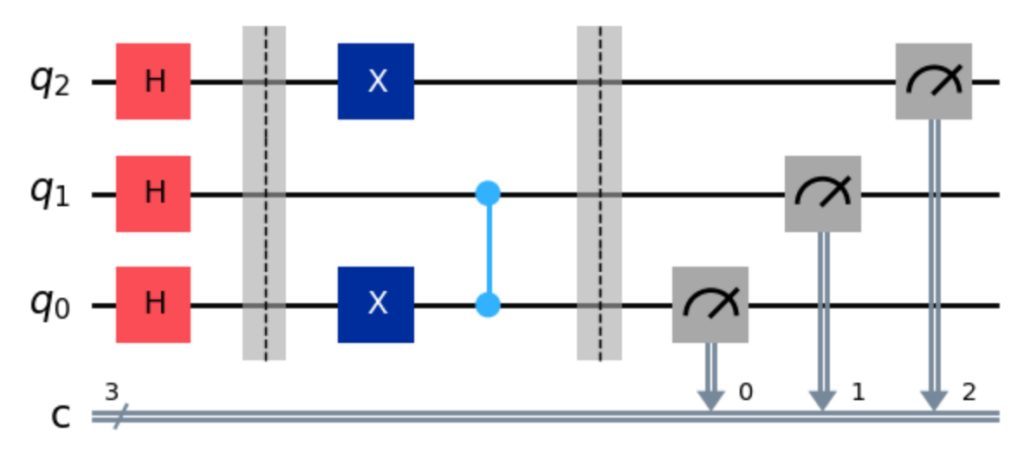
circuit.draw(output="mpl", reverse_bits=True)

As you can see, the qubits are listed now from the last (and not first) index at the top.
Styling

Surprisingly enough, Matplotlib supports providing custom styles to the rendering engine. You can create a style object (using a syntax known from CSS), and then pass it to your drawing function like in the following example.

background = {"backgroundcolor": "lightblue"}
circuit.draw(output="mpl", style=background)

It will obviously change the background colour to light blue.

You can also steer the scale of the image by setting the scale parameter of the draw function, like in the following example:

circuit.draw(output="mpl", scale=0.3)

This may help visualising bigger circuits in Jupyter notebooks by shrinking them.

Folding

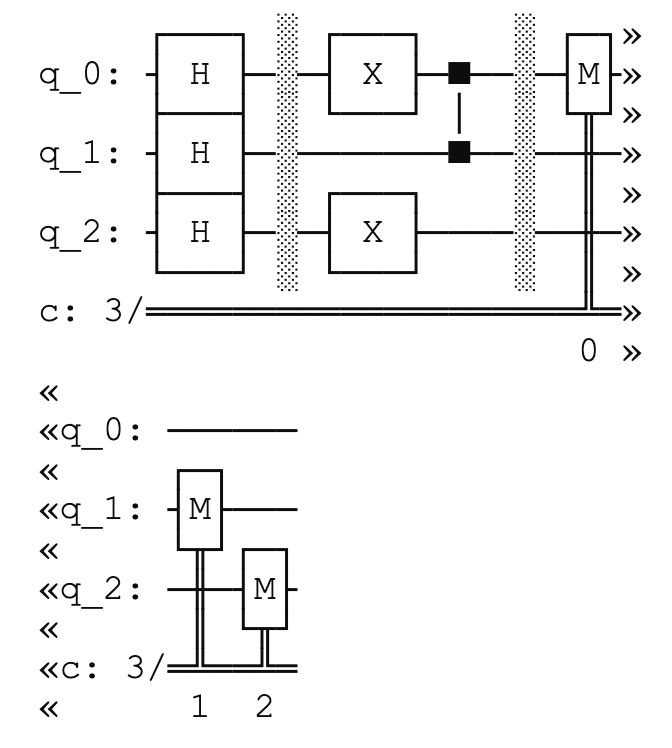
Folding was a very popular technique of managing the output of programs back in the days where command line interfaces were prevalent. You can still see it in action today if you use tools like AWS CLI. It serves the same purpose in Qiskit. If you use the text rendering engine, and you have strict display size limitations, you can fold the output to the next line like this:

circuit.draw(output="text", fold=30)

The result looks somewhat funny, with the double arrows indicating the folding line. I do not recall using it before doing the research for this blog post, but I hope this trick may save you one day.
Standalone function

Last but not least, Qiskit allows printing circuits without invoking functions on them. There is a standalone function circuit_drawer that effectively does the same as the draw function from the QuantumCircuit class. You have to import a separate package — qiskit.visualization — in order to benefit from it, but otherwise the usage is quite straightforward.

from qiskit.visualization import circuit_drawer
circuit_drawer(circuit, output="mpl")

The function supports all of the parameters and print options that I discussed in this article, and I encourage you to experiment a bit with it.

Conclusion

Visualisation is not a luxury, it is a necessity when you start to juggle more than a handful of qubits or when you need to communicate your ideas to others. In Qiskit the draw method is the gateway to a rich set of tools that let you switch between a quick text preview, a tidy Matplotlib image, or a high‑resolution LaTeX output with a single line of code. You can even open the figure in a separate window, drop in barriers to group logical blocks, reverse the qubit order to match your intuition, and customize colours, scale or background with a few dictionary entries. If you prefer a more imperative style, the circuit_drawer helper gives you the same flexibility without having to touch the circuit object itself.

Beyond the aesthetics, these visual aids help you spot mistakes, understand interference patterns, and explain the behaviour of your circuit in papers, slides or notebooks. The ability to fold long text outputs, to save diagrams in vector formats, and to toggle optional features like barriers means you can adapt the same code to a wide range of audiences and display constraints.

Circuit visualisation is just a beginning, a step that you should remember before submitting your circuit to run on a simulator or real hardware. But the journey does not end here. In the next part of this series we will take a look at visualising computation results.

Pauli operators

Quantum computing basics part 1

Learning quantum computing (which I abbreviate as QC in this series’ titles) can be, and often is, challenging. One of the common problems is finding resources that help learning the basics with some practical examples (and not only mathematical equations). This inspired me to start a series of articles that cover exactly this — quantum computing basics — with focus on coding them with Qiskit. You can find all the articles under the #qcbasics hashtag.

In this post I write about Pauli operators — one of the most important single-qubit operators available for quantum programmers. They are used for the most common qubit operations, they form measurement bases, and they are absolutely crucial for quantum error correcting codes, among other things. They are also simple enough to be a great starting point.

Defining Pauli operators

There are four Pauli operators: identity, bit-flip, bit-and-phase-flip, and phase-flip. They are represented with the following symbols: {"font":{"size":11,"family":"Arial","color":"#000000"},"aid":null,"backgroundColor":"#ffffff","id":"1","code":"$$\\mathbb{I}$$","type":"$$","backgroundColorModified":false,"ts":1772710460915,"cs":"PBtLbk5xx0EER9KhBoxrtg==","size":{"width":5,"height":10}}, X, Y, and Z. We will look at them in detail in a moment. But let me cover their common properties before.

They are all represented by 2 ⨉ 2 matrices. Such matrices are called square matrices. All Pauli operators are also unitary matrices. 

Unitary matrices

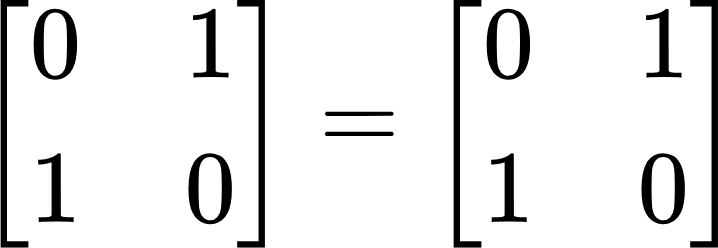
A unitary matrix is a matrix that is invertible, which means that its inverse (U-1) is equal to its conjugate transpose (U*). What does it mean? Let us take the X operator as an example.

On the left-hand side you can see X’s reverse, and on the right-hand side X’s conjugate transpose.

(If you do not know how to calculate those, you can use this calculator.)

Finally, a unitary matrix must satisfy the following condition as well — a product of the matrix itself and its conjugate transpose must be equal to the identity matrix.

Generally, all quantum operators must be unitary, since everything that happens in a quantum processor must be reversible. 

Hermitian matrices

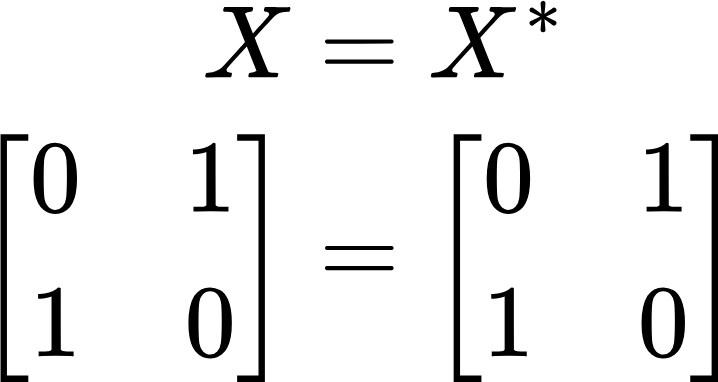
All Pauli operators are also Hermitian matrices. It means that they are equal to their own conjugate transpose. Following the previous example with the X operator, let us take a look at the following example.

This one was easier, was it not?

Anti-commuting

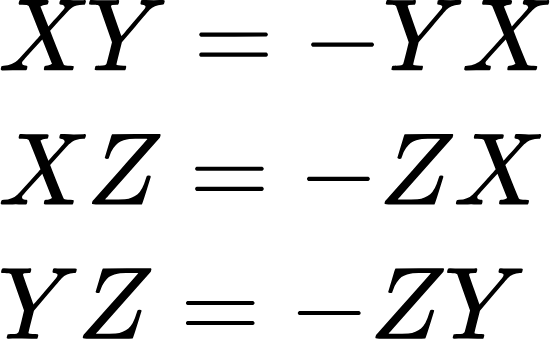
Each Pauli operator anti-commutes with each other (except for the identity operator). Fancy wording, but what does it mean? If a mathematical operations anti-commutes it means that swapping the position of two arguments of an this operation gives a result which is the inverse of the result with unswapped arguments. In case of the Pauli operators it looks like the following:

Multiplication

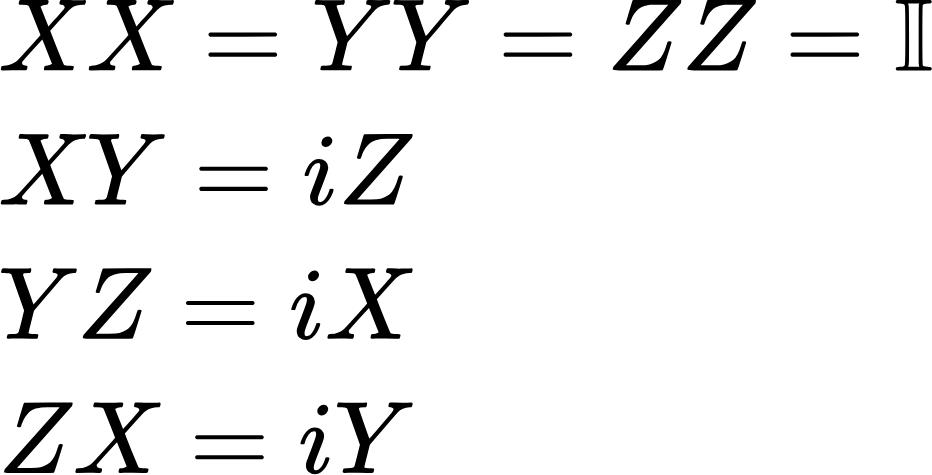
The Pauli operators multiply as any other square matrix, but I listed the multiplication rules here in case you would need them.

{"backgroundColor":"#ffffff","backgroundColorModified":false,"type":"$$","code":"$$i$$","id":"7","font":{"size":11,"color":"#000000","family":"Arial"},"aid":null,"ts":1772712509469,"cs":"yTgQcoob8MkrhfE41BAedw==","size":{"width":4,"height":10}} stands for an imaginary part of a complex number

The identity operator

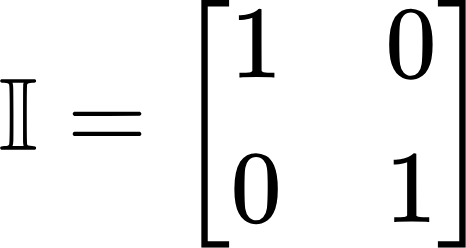
We covered all the properties of Pauli operators, but we have not taken a look at the operators themselves. Let us begin with the identity operator, the only operator that is actually trivial in this set as it does nothing to the state of a qubit. The matrix for this operator looks like the following.

I promised practical examples, and the time has come to code something. All the examples in this article follows the same template:

  1. Define a |1⟩ qubit.
  2. Define a quantum circuit with the demonstrated operator as a gate, and visualise it.
  3. Define a quantum circuit with the demonstrated operator as an operator, and visualise it.

The most common way of using this operator is as a gate, like in the following example.

qc = QuantumCircuit(1)
qc.id(0)

Qiskit, however, allows for more complicated usage of Pauli operators using a dedicated class, and circuit appending instead.

qc = QuantumCircuit(1)
i_operator = Pauli('I')
qc.append(i_operator, [0])

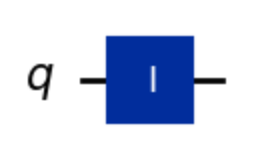
In any case, the circuit looks like below and yields |1⟩ as the result.

The bit-flip operator

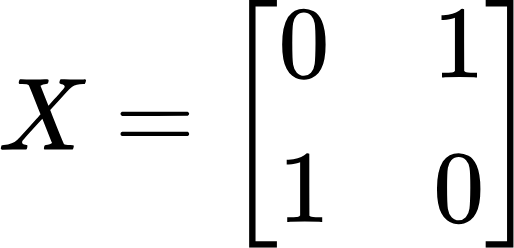
The identity operator is indeed trivial, so let us switch to something that actually does something — the bit-flip, or X operator. It does something relatively simple, namely reverses whatever the value of a qubit is. It is characterised by the following matrix.

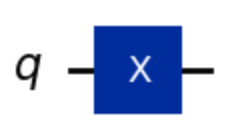
Here is how the operator looks like as a gate.

qc = QuantumCircuit(1)
qc.x(0)

And the corresponding operator part.

qc = QuantumCircuit(1)
x_operator = Pauli('X')
qc.append(x_operator, [0])

In both cases, the result of this operation is |0⟩, and the circuit looks like the following.

The phase-flip operator

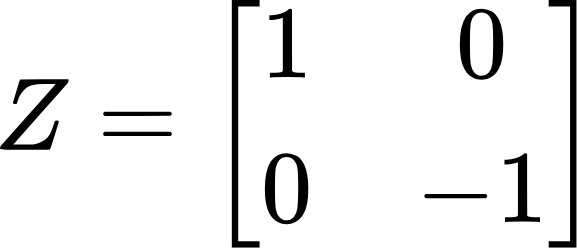
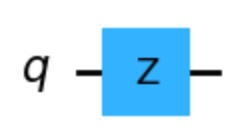
The next operator — the bit-flip or Z operator — does the same thing to the phase as the X operator does to the bit value. It flips it. The trick is that it is not visible in the classical readout operation that one usually applies to see the results. The state is purely quantum, and cannot be directly translated. It is defined by the following matrix.

When coded as a gate, it looks like this.

qc = QuantumCircuit(1)
qc.z(0)

And here as an operator.

qc = QuantumCircuit(1)
z_operator = Pauli('Z')
qc.append(z_operator, [0])

In both cases again, the result is the same. It is |-⟩ (would be |+⟩ if the input was |0⟩). And in the diagram.

The bit-and-phase-flip operator

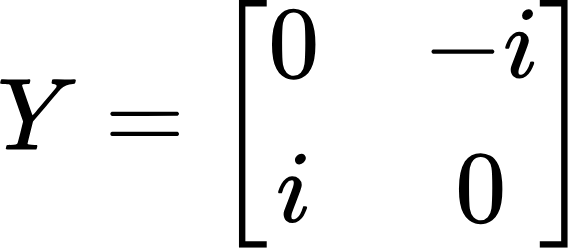
Last but not least, we have the bit-and-phase or Y Pauli operator. It is sort of a mixture of the X and Z operators, since it does both things. Remember, however, that only the bit-flip part can be measured classically, as the phase part is lost during a readout. Here is the matrix.

If we implement it as code, we do it in the following way.

qc = QuantumCircuit(1)
qc.y(0)

And similarly as an operator.

qc = QuantumCircuit(1)
y_operator = Pauli('Y')
qc.append(y_operator, [0])

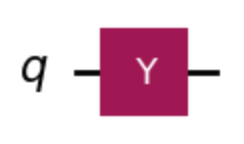
The result we get is |-i⟩ (would be |i⟩ if the input was |0⟩). The diagram is as follows.

Operators in Qiskit

Gates in Qiskit are handy functions that allow one to create circuits quickly, but abstract away a lot of details and low-level functionality. Defining circuits with operators is much more verbose, but allows implementations which are more detailed and flexible. I will not dig into the details here, since it is a broad topic which deserves its own article (or a book, actually). However, below you can find a sample code snippet that will give you a glimpse of their capabilities.

# Multi-qubit Pauli (Z ⊗ X on two qubits): Z on qubit 0, X on qubit 1.
pauli_zx = Pauli('ZX')

# Convert to Operator for matrix math.
op_x = Operator(pauli_x)
print(op_x.data)

# Check commutation.
print(pauli_x.compose(pauli_z).commutes(pauli_z.compose(pauli_x)))

Summary

The Pauli operators are one of the most basic building blocks of quantum circuits, gadgets and algorithms. There are four of them: {"font":{"size":11,"family":"Arial","color":"#000000"},"aid":null,"backgroundColor":"#ffffff","id":"1","code":"$$\\mathbb{I}$$","type":"$$","backgroundColorModified":false,"ts":1772710460915,"cs":"PBtLbk5xx0EER9KhBoxrtg==","size":{"width":5,"height":10}}, X, Y, and Z, also called the identity, bit-flip, bit-and-phase-flip, and phase-flip operators. Each of them is represented with a square matrix that is both unitary and Hermitian.

The operators can be used on a single qubit in Qiskit either as gates, or operators. The gate representation allows us for faster implementation, and cleaner code, but the operator representation gives us power over the low-level implementation details, and more flexibility.

Overall, the Pauli operators are something that any quantum developer must be familiar with, as they are virtually in any quantum circuit we will ever build. Even if we do not use them explicitly, they are the foundation of modern-day error-correction codes that allow us to use qubits reliably. 

Quantum Computing in Java

If you are new to quantum computing, then the title of this post will not sound suspicious or provocative to you. However, if you are a seasoned quantum user then you will know that something must be off here. After all, your language of choice is most likely Python, or maybe C if you are working on high-performing solutions. 

The majority of frameworks and libraries in the field of quantum computing are written in Python, and made for this language. I am thinking of Qiskit, Ocean, and cirq, among others. There is a big ongoing effort by IBM to develop a parallel Qiskit framework for the C language, and one can even try Q# from Microsoft. What they have in common is comprehensive functionality, big company backing, and integration with real quantum hardware (to different extents, though).

But what about Java? Is it even possible to do any useful quantum development in this language? For a big part of my career I have been a Java/Kotlin developer, so this question is somewhat personal to me. And the answer is… it is complicated. There are two libraries that I have managed to find, and two JEPs that are focused on quantum computing. How useful are they? Let us find out.

JQuantum

The first library we are going to take a look at is called JQuantum. If you click on the link the first thing you will notice is that it has not been updated since 30th July 2018. Being so outdated does not make it a candidate for any production project. Can it be of any use anyway?

JQuantum contains implementation of basic quantum computing concepts. You can find there classes for qubits, gates, circuits, and even the most famous algorithms like Grover’s algorithm or Shor’s algorithm.

Sadly, the library does not have any form of a simulator, not to mention the possibility to run the code against a real QPU. You can run your programs and output their results, but what JQuantum does behind the scenes is just linear algebra on vectors and matrices. Since the amount of memory necessary to contain multidimensional matrices scales exponentially, the amount of qubits you can use in JQuantum is severely limited. After all, even the simplest gates are two-dimensional matrices, and adding each qubit effectively doubles the number of dimensions in the matrix that represents such a system.

Okay, so the library is outdated, and its functionality is quite limited. Can we put it to any use then? In fact, we can. Let us take a look at a sample code.

class JQuantumExample implements Example {
    @Override
    public void show() {
        var qubitValue = 0;
        var quantumRegister = new QubitRegister(1, qubitValue);
       
        var notGate = QuantumGate.X;
        notGate.accept(quantumRegister);
        var measurement = quantumRegister.measure();
       
        System.out.println("JQuantum Example");
        System.out.println("----------------");
        System.out.println("Applied X gate to |" + qubitValue + "⟩; result is |" + measurement +"⟩.");
        System.out.println();
    }
}

In the code snippet above, we first create a qubit in the |0⟩ (read 0-ket) state. If you do not know what kets are, please read my post about them. Then, we create a quantum register (processor’s memory) with one qubit. We instantiate a NOT gate, often called an X gate. Then, we apply the X gate to the register, effectively flipping the value of the qubit from |0⟩ to |1⟩. Finally, we measure.

The measurement in quantum computing is an act of “translating” the result of the computation from quantum encoding to classical (i.e. binary) encoding. Thus, whatever is yielded by the program, ends up as either |0⟩ or |1⟩. Any other quantum state (and there is an infinite number of them) cannot be processed then by classical computers.

This code may not earn you any money, but it can still demonstrate basic principles of quantum programs. And this is what the JQuantum library is great for: education. If you have never written a line of code in any language other than Java, you can still learn a solid piece of quantum computing with this library.

If you would like to run this program you must add the Quantum.jar file to your classpath. You can find it in the root tree in the JQuantum’s repository.

Strange

If you are a Marvel fan, then you may be disappointed that I will not be writing about your favourite doctor here. Instead, Strange is the name of a quantum library written for the book Quantum Computing in Action by Johan Vos.

Strange is an open-source learning resource that can be used alongside the aforementioned book, or by itself. It is available via Maven Central, so no manual installation is needed like it was the case with JQuantum.

It has somewhat similar functionality to that library. You will find abstractions for qubits, gates, circuits (under the name of programs), and quantum algorithms. The collection is a bit smaller than in JQuantum, though.

On the upside, Strange does contain a quantum simulator. It is a simple one, without any sophisticated features of modern-day simulators (like noise or hardware-specific characteristics), but it can still be pretty useful. There are traces in the code that cloud integration was in progress, but it has never been finished. Thus, you cannot run code written with Strange on any actual quantum hardware.

Let us take a look at a code example.

public class StrangeExample implements Example {
   @Override
   public void show() {
       var qubitValue = 0;
       var program = new Program(1);
       var x = new X(qubitValue);

       var negationStep = new Step();
       negationStep.addGate(x);
       program.addStep(negationStep);

       var executionEnvironment = new SimpleQuantumExecutionEnvironment();
       var result = executionEnvironment.runProgram(program);
       var measurement = result.getQubits()[0].measure();
       
       System.out.println("Strange Example");
       System.out.println("---------------");
       System.out.println("Applied X gate to |" + qubitValue + "⟩; result is |" + measurement +"⟩.");
       System.out.println();
   }
}

This program does exactly the same thing as the previous one, and the first three steps are almost identical. The difference starts from the definition of a step. Steps are phases of a circuit, which is called a program in Strange. So in order to code the negation, we must first define a step for it (negationStep) and then add it to the program with the addStep method. Next, we have to instantiate the simulator in the form of executionEnvironment. Finally, we can run it, and obtain a measurement from the result.

Though JQuantum and Strange are very alike, the functionality of Strange is somewhat more robust. Both, however, are great learning resources for quantum computing newbies. Unfortunately, doing any real-life project with Strange is as unfeasible, as with JQuantum.

Post-quantum Cryptography

Believe it or not, but quantum computers are going to break all the cryptography that we use on an everyday basis. SHA, RSA, Diffie-Helman, and related protocols are useless against the codebreaking capabilities of future quantum computers. Luckily, they are not here yet. Even more luckily, I will spare you all the difficult math related to this issue.

Although quantum computers with enough qubits to run Shor’s algorithm for the inputs of size of nowadays use cryptographic keys are still at least a couple of years away, cryptographers have already started working on cryptographic protocols that are quantum-safe. By this they mean that they cannot be cracked by any kind of quantum computer or algorithm (at least for now). Why do they do this? There is an old attack pattern that relies on evasedropping the data now for later decryption. If an attacker follows it it can for example steal the packets in which you authenticate with your bank in hope of decrypting them whenever possible and obtaining your credentials. It may seem futile at first, but if a feasible quantum computer arrives in two years, then a lot of this data may still be valid. After all, how often do you rotate your bank password?

I mentioned that the cryptographers have already begun working on a solution. It arrived in the form of NIST standards in August 2024. Shortly after that, two JEPs were published: 496 and 497. The first one provides implementation for cryptographical keys creation and encapsulation. The second one is very similar, but can be used for signing, not encrypting keys. They can be used in the following way.

class PostQuantumCryptographyExample implements Example {
   @Override
   public void show() {
       try {
           var mlKem = "ML-KEM";
           var encryptionKeyGenerator = KeyPairGenerator.getInstance(mlKem);
           encryptionKeyGenerator.initialize(NamedParameterSpec.ML_KEM_512);
           var encryptionKeys = encryptionKeyGenerator.generateKeyPair();

           System.out.println("Post-Quantum Cryptography Example");
           System.out.println("---------------------------------");

           var publicEncryptionKey = encryptionKeys.getPublic().getEncoded();
           String publicKeyBase64 = Base64.getEncoder().encodeToString(publicEncryptionKey);
           System.out.println("Public key generated with " + mlKem + ": " + publicKeyBase64);

           var mlDsa = "ML-DSA";
           var signingKeyGenerator = KeyPairGenerator.getInstance(mlDsa);
           var signingKeys = signingKeyGenerator.generateKeyPair();
           var privateSigningKey = signingKeys.getPrivate();

           var helloWorld = "Hello World";
           byte[] message = helloWorld.getBytes();
           Signature signature = Signature.getInstance(mlDsa);
           signature.initSign(privateSigningKey);
           signature.update(message);
           byte[] signedMessage = signature.sign();

           System.out.println("Message \"" + helloWorld + "\" signed with " + mlDsa + ": " + Base64.getEncoder().encodeToString(signedMessage));
       } catch (NoSuchAlgorithmException | InvalidAlgorithmParameterException | InvalidKeyException |
                SignatureException e) {
           throw new RuntimeException(e);
       }
   }
}

If you have ever used other cryptographic keys in Java, then I am quite sure this code feels familiar to you. I will not describe it in detail here, since there is nothing related to quantum computing in it. We cannot use these implementations for working with qubits, gates or circuits. In fact, they do not even require a quantum computer to run. Instead, they rely on lattice structures that are immune to Shor’s algorithm since they do not use big primes multiplication.

Conclusion

While Java may not be the first choice for quantum computing due to the lack of robust, up-to-date libraries and frameworks, there are still learning resources available for those interested. The JQuantum and Strange libraries, although outdated or limited in functionality, can serve as valuable educational tools for beginners.

Moreover, with the impending threat of post-quantum cryptography being broken by future quantum computers, Java has already started addressing this challenge through JEPs 496 and 497. These provide implementations for creating and encapsulating cryptographic keys, ensuring our data remains secure even in a post-quantum world. Although they cannot be used for general quantum computing, they should at least provide a cornerstone for reliability of Java application in the quantum era.

While Java may not be the language of choice for quantum computing today, it is still possible to learn basic principles and prepare for a future where quantum-safe cryptography becomes the norm.

You can find all the code examples on my GitHub.

Post Scriptum

If you are interested in the prospects of quantum computing in Java and its future, I warmly invite you to join me on JavaZone2025 in Lillestrøm, Norway where I’ll give a lightning talk titled Quantum Leap with Java: An Unrealistic Dream? You can keep an eye on the program here. I am hoping to see you there!

Quantum vs Classical Computing: How Different Are They?

Computation is a core aspect of modern technology, driving innovations across science, engineering, entertainment, and communication. But what exactly is a computation, and how does it differ in classical and quantum contexts?

What is Computation?

At its most fundamental level, computation refers to using technology to perform tasks, solve problems, and manipulate information. Whether it’s simulating physical systems, developing intelligent algorithms, or managing vast data sets, computation is the bedrock of all digital advancements. Classical computing, which powers most of today’s digital systems, has long been the standard. However, quantum computing, a revolutionary paradigm, promises to redefine what’s possible in the field.

Classical vs. Quantum Computation

Classical Computing

Classical computing is rooted in binary logic. The smallest unit of information is a bit, which can exist in one of two possible states: 0 or 1. Every computation a classical computer performs is deterministic, meaning the result is always predictable based on the input. Operations are executed using logic gates, and bits can be copied, stored, and manipulated across various systems and memory registers without loss of information.

To illustrate, consider a light switch. A light switch can only be ON or OFF just like a bit can only be 1 or 0. Classical computers, no matter how complex, are simply massive collections of these switches, manipulating them to perform calculations. While highly effective for many applications, classical computers are limited by their binary nature.

Quantum Computing

Quantum computing, on the other hand, is a game changer because it relies on principles from quantum mechanics, which describe the behaviour of particles at extremely small scales. Instead of bits, quantum computers use qubits as the fundamental unit of information. Unlike classical bits, qubits can exist in an infinite number of states.

The state of a qubit can be visualised using a Bloch sphere. Imagine a globe, with 0 at the South Pole and 1 at the North Pole. While a classical bit is like a light switch, only toggling between ON (1) or OFF (0), a qubit can be any point on the surface of this globe. It can blend 0 and 1 in a continuum of possibilities, opening up a much larger space for computation.

Moreover, quantum operations exploit unique quantum phenomena, such as entanglement and superdense coding, which enable powerful new methods of processing information that classical systems cannot easily replicate.

What Makes Quantum Computation Different?

Quantum computing fundamentally differs from classical computing in several key ways:

  1. Superposition and Infinite States: A single qubit can encode an infinite number of possible states, as opposed to the strict binary options of classical bits. This means quantum computers can process much more information simultaneously.
  2. Measurement and Probability: While qubits can exist in an infinite number of states, any attempt to measure them translates their quantum state into a classical state (either 0 or 1). This process is probabilistic. The quantum state does not yield a fixed answer but rather gives a probability distribution over possible outcomes, which makes quantum computing inherently different from the deterministic operations of classical systems.
  3. No Cloning: A vital distinction between classical and quantum systems is that qubits cannot be copied. In classical computing, data can be duplicated as needed, but in quantum systems, copying qubits requires measurement, which essentially destroys their quantum states. This limitation introduces significant challenges in designing quantum memory and other hardware.
  4. Quantum Speedup: While quantum computers still rely on classical control processors, they can solve certain types of problems far more efficiently. The sheer complexity of operations performed on multiple qubits in superposition provides a level of computational parallelism that classical systems can’t achieve. As a result, quantum computers can solve some problems exponentially faster than classical computers.

Classical vs Quantum: Two Types of Computation

In formal terms, classical computing is a subset of quantum computing. Quantum systems are, by their nature, a more general form of computation. A quantum computer can theoretically perform any task a classical computer can, but the reverse isn’t true.

While classical systems excel at deterministic, straightforward calculations and are still the most practical solution for everyday computing needs, quantum computers promise breakthroughs in fields like cryptography, materials science, and complex simulations. However, the full potential of quantum computing is still in its early stages, with numerous technical challenges remaining.

Conclusion

The advent of quantum computing represents a paradigm shift in how we think about computation. While classical computing remains essential for most of today’s technology, quantum computing opens the door to unprecedented computational power. By leveraging the principles of quantum mechanics, future quantum computers will tackle problems once deemed unsolvable, pushing the boundaries of science, technology, and innovation.

The light switch analogy offers a simple glimpse into the complexity of these two systems: while classical bits are limited to being ON or OFF, qubits, like points on the surface of a sphere, reveal an infinite range of possibilities. This difference is the key to quantum computing’s extraordinary potential. The future of computation lies in the quantum realm, where the probabilistic nature of the universe is harnessed for revolutionary breakthroughs.